 08045801231
 Send Inquiry


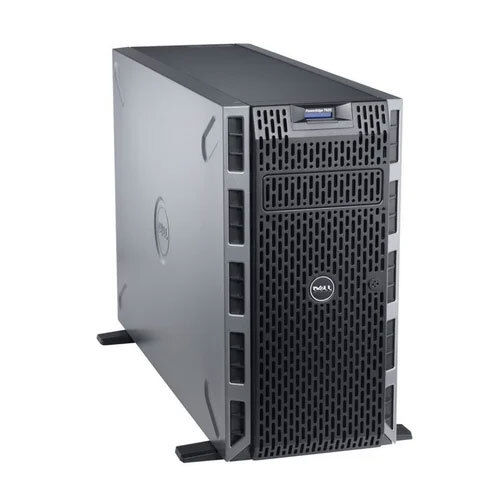
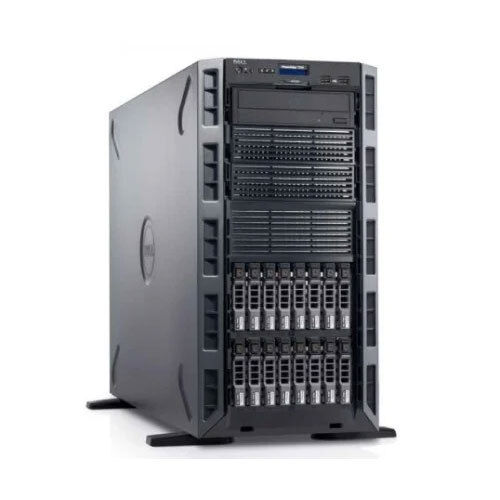
Dell Poweredge T620 Tower Server
15000 INR/Piece
Product Details:
- Processor Type Intel Xeon E5-2600 series
- Processor Speed 2.1 ghz
- Type Tower
- Chipset Intel C600 series
- Max Memory Capacity 768GB DDR3 ECC
- Max Processors 2
- External HDD Supported via SAS/SATA
- Click to View more
X
Dell Poweredge T620 Tower Server Price And Quantity
- 15000 INR/Piece
- 1 Piece
Dell Poweredge T620 Tower Server Product Specifications
- Intel C600 series
- 2
- 2.1 GHz
- 10C to 35C
- Lan
- Up to 32TB
- Supported via SAS/SATA
- AC
- 768GB DDR3 ECC
- 2.1 ghz
- Windows
- Intel Xeon E5-2600 series
- Tower
- Yes
- 7
- Multiple
- Available
- T620
- LAN support
- Integrated
- 4 ports
Dell Poweredge T620 Tower Server Trade Information
- 10-15 Piece Per Week
- 1-2 Days
Product Description
| Brand | Dell |
| Model Name/Number | T620 |
| Processor | 2.1 ghz |
| Supported Operating Systems | Windows |
| Power Supply | AC |
| Number Of Ports/Channels | 4 |
| Networking Type | LAN |
| Country of Origin | Made in India |
Enhanced Performance and Expansion
The PowerEdge T620 delivers exceptional processing power, supporting up to two Intel Xeon E5-2600 series CPUs and an expansive 768GB DDR3 ECC memory. Seven PCIe slots offer remarkable upgrade opportunities for additional network cards or storage controllers, ensuring the server grows in step with organizational needs.
Reliability and Data Protection
Equipped with redundant power supply options and comprehensive RAID support, the T620 is tailored for uninterrupted operations and data integrity. Combined with robust hardware and error-correcting memory, businesses can trust this server for mission-critical applications.
Versatile Configuration and Connectivity
Featuring multiple USB ports, four LAN-supported network connections, and integrated graphics, the T620 adapts to varied business environments. Its compatibility with SAS/SATA external hard drives and up to 32TB internal storage capacity facilitates efficient data scalability and system flexibility.
FAQ's of Dell Poweredge T620 Tower Server:
Q: How can the Dell PowerEdge T620 be utilized to benefit a growing business?
A: The PowerEdge T620 provides a high level of processing power, memory capacity, and storage scalability, making it suitable for businesses that anticipate expansion. Its robust architecture supports essential workloads such as data management, virtualization, and collaborative applications, helping businesses maintain efficiency as they grow.Q: What is the process for installing additional storage or memory on the T620 server?
A: To expand storage or memory on the T620, power down the server and unplug it. Open the tower to access memory slots or drive bays. Insert compatible DDR3 ECC RAM or SAS/SATA drives into the designated slots. Ensure components are properly seated before closing the chassis and restarting the server. For best practices, refer to Dell's official service manual when adding or upgrading hardware.Q: When should RAID be configured on the T620 server, and what are the benefits?
A: RAID should be configured during the initial server setup or when adding new drives. It offers significant benefits such as improved data redundancy, increased storage performance, and enhanced fault tolerance, protecting critical business information from hardware failures.Q: Where can this server be deployed for optimal performance?
A: The Dell PowerEdge T620 is designed for use in temperature-controlled environments (10C to 35C) such as office server rooms or small data centers. Its tower form factor makes it ideal for businesses without dedicated rack infrastructure, allowing flexible placement options.Q: How does the redundant power supply improve uptime for businesses?
A: Redundant power supplies ensure the server remains operational even if one power unit fails. This feature minimizes downtime and maintains continuous server availability, which is crucial for businesses that rely on uninterrupted access to data and applications.Q: What steps do I need to follow to connect the T620 to my company LAN?
A: First, ensure the T620 is powered down. Connect an Ethernet cable to one of the four LAN ports and to your network switch or router. Power on the server, configure the network settings through the BIOS or installed operating system (such as Windows), and confirm the server communicates with your company's network infrastructure.Q: What operating systems are supported by the Dell PowerEdge T620?
A: The Dell PowerEdge T620 is validated to support Windows operating systems. This ensures seamless compatibility with standard business applications and simplifies ongoing system updates and security management.Tell us about your requirement

Price:
Quantity
Select Unit
- 50
- 100
- 200
- 250
- 500
- 1000+
Additional detail
Mobile number
Email

Other Products in 'Tower Server' category

Contact Details
IMPRESSIVE COMPUTERS
GST : 27AZEPK8285C1Z7
GST : 27AZEPK8285C1Z7

Address
- No. 4/41-A, Hasan Ali House, Noor Baug,Mumbai - 400009, Maharashtra, India
- Phone : 08045801231


 Send Inquiry
|


 Send Inquiry
 Send SMS
 |
IMPRESSIVE COMPUTERS
All Rights Reserved.(Terms of Use) Developed and Managed by Infocom Network Private Limited. |
