
 08045801231
 Send Inquiry


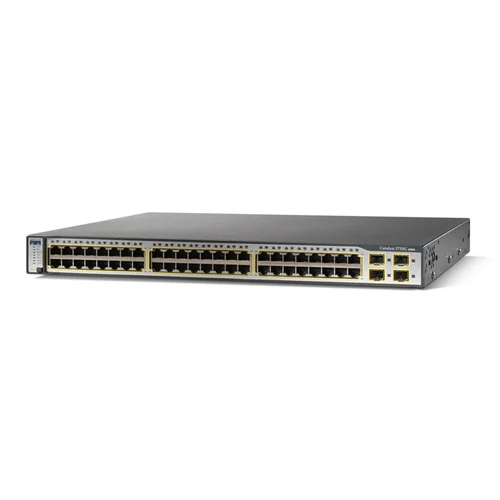
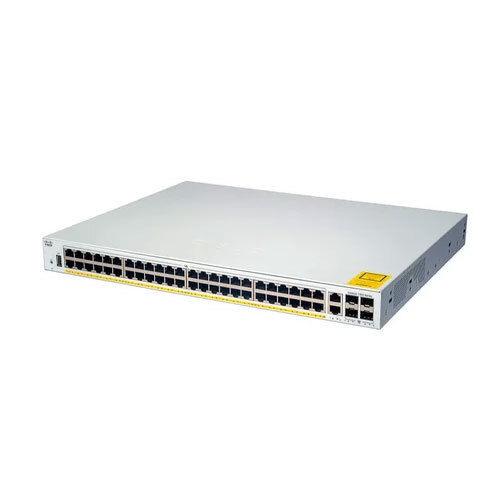
Cisco Switches Networking Switches
4000 INR/Piece
Product Details:
- IP Routing Supported
- Network Device Router
- Power Supply AC only
- Dimension (L*W*H) 1.73 x 17.5 x 16.1 Inch (in)
- Usage & Applications Enterprise LAN Networking
- Port LAN ports, SFP uplink ports
- Remote Control Yes
- Click to View more
X
Cisco Switches Networking Switches Price And Quantity
- 4000 INR/Piece
- 1 Piece
Cisco Switches Networking Switches Product Specifications
- Wired Ethernet
- Supported
- Router
- AC only
- 48 Ports
- Enterprise LAN Networking
- 1.73 x 17.5 x 16.1 Inch (in)
- LAN ports, SFP uplink ports
- Yes
- Hassle free performance, Long service life, Excellent functionality
- Ethernet, SFP
- Dependent on network specification
- Approx. 4.5 - 5.0 kg
- Rackmount Switch
- 0C to 45C approx.
- 38.7
- Integrated
- Layer 2/3 Switch
- Yes
- Long
- LAN Capable
- Excellent
- AC only
- Supported
- Gigabit Ethernet
- Available
- Yes
- Web/CLI
- Metal
- Hassle free
Cisco Switches Networking Switches Trade Information
- 10-15 Piece Per Week
- 1-2 Days
Product Description
Cisco Switch Networking Switch is a suitable solution to establish connection among printer, computer and other networking devices. It enables user to share data and to promote smooth communication among employees or between organization and customers. Cisco switch is also suitable for segmenting a network into multiple subnets for the safety of data and also for effective isolation of network traffic.
Cisco Switch Networking Switch supports PoE for providing power to connected systems that include wireless access point, IP phone and video camera. It also plays a pivotal role in improving the availability of bandwidth and redundancy of network.
Product details
|
Performance |
Hassle free |
|
Service life |
Long |
|
Functionality |
Excellent |
|
Area Network Type |
LAN Capable |
|
Dimensions (H x W x D) |
1.73 x 17.5 x 16.1 inch. (4.4 x 44.5 x 40.9 cm.) |
|
Packets per second (Mpps) |
38.7 |
|
AC/DC Support |
AC only |
Enterprise-Grade Performance and Longevity
Cisco's Networking Switches are engineered for demanding enterprise LAN environments, offering high packet forwarding rates and long-term durability. With a sturdy metal chassis and a robust power supply, these switches are rack-mountable and support hassle-free operation through their advanced management interfaces, making them a reliable solution for businesses seeking seamless connectivity and network performance.
Versatile Connectivity and Advanced Functionality
Outfitted with 48 Gigabit Ethernet ports, SFP uplink support, and VLAN capabilities, these switches deliver flexible connectivity options. Layer 2/3 functionality ensures efficient routing and switching within local area networks, and stackable units allow for scalable network expansion. Integrated LED indicators and security features enhance usability and safety in enterprise deployments.
FAQ's of Cisco Switches Networking Switches:
Q: How can Cisco Networking Switches be managed remotely?
A: Cisco switches support remote management through intuitive web interfaces and command-line (CLI) options, allowing administrators to configure, monitor, and troubleshoot network settings from virtually any location.Q: What benefits do these switches offer for enterprise LAN networking?
A: These rackmount switches provide reliable, high-speed connectivity, advanced Layer 2/3 routing, and stackable scalability. Their robust construction and integrated security ensure optimal network uptime and data protection in demanding business environments.Q: When should I use SFP uplink ports instead of standard LAN ports?
A: SFP uplink ports are ideal for high-speed fiber optic connections, typically when connecting to backbone networks, other switches across wider distances, or for uplinks requiring greater bandwidth than standard copper LAN ports can provide.Q: Where can these Cisco switches be installed for best performance?
A: Install these switches in enterprise data centers or network racks within temperature-controlled environments, ensuring proper rackmounting and access to AC power for optimal performance and longevity.Q: What is the process for configuring VLANs on these switches?
A: VLANs can be configured via the web management interface or CLI. Administrators create virtual networks, assign switch ports, and define policies to segment traffic, enhancing security and streamlining network management.Q: How does the metal chassis and AC power supply contribute to the switch's service life?
A: The metal chassis provides superior protection against physical damage and electromagnetic interference, while the reliable AC power supply ensures continuous operation, contributing to the switch's long service life and durability.Tell us about your requirement

Price:
Quantity
Select Unit
- 50
- 100
- 200
- 250
- 500
- 1000+
Additional detail
Mobile number
Email

Other Products in 'Networking Switches' category

Contact Details
IMPRESSIVE COMPUTERS
GST : 27AZEPK8285C1Z7
GST : 27AZEPK8285C1Z7

Address
- No. 4/41-A, Hasan Ali House, Noor Baug,Mumbai - 400009, Maharashtra, India
- Phone : 08045801231


 Send Inquiry
|


 Send Inquiry
 Send SMS
 Call Me Free
 |
IMPRESSIVE COMPUTERS
All Rights Reserved.(Terms of Use) Developed and Managed by Infocom Network Private Limited. |
